
搜索到
3
篇与
的结果
-
 常用VPS脚本【合集-不定期更新】 1、DD重装脚本史上最强脚本wget --no-check-certificate -qO InstallNET.sh 'https://raw.githubusercontent.com/leitbogioro/Tools/master/Linux_reinstall/InstallNET.sh' && chmod a+x InstallNET.sh && bash InstallNET.sh -debian 12 -pwd 'password'萌咖大佬的脚本bash <(wget --no-check-certificate -qO- 'https://raw.githubusercontent.com/MoeClub/Note/master/InstallNET.sh') -d 11 -v 64 -p 密码 -port 端口 -a -firmwarebeta.gs大佬的脚本wget --no-check-certificate -O NewReinstall.sh https://raw.githubusercontent.com/fcurrk/reinstall/master/NewReinstall.sh && chmod a+x NewReinstall.sh && bash NewReinstall.shDD windows(使用史上最强DD脚本)bash <(curl -sSL https://raw.githubusercontent.com/leitbogioro/Tools/master/Linux_reinstall/InstallNET.sh) -windows 10 -lang "cn"账户:Administrator密码:Teddysun.com2、综合测试脚本LemonBenchwget -qO- https://raw.githubusercontent.com/LemonBench/LemonBench/main/LemonBench.sh | bash -s -- --fast融合怪bash <(wget -qO- --no-check-certificate https://gitlab.com/spiritysdx/za/-/raw/main/ecs.sh)NodeBenchbash <(curl -sL https://raw.githubusercontent.com/LloydAsp/NodeBench/main/NodeBench.sh)yabscurl -sL yabs.sh | bash使用gb5测试yabscurl -sL yabs.sh | bash -53、性能测试gb5专测bash <(curl -sL bash.icu/gb5)4、流媒体及IP质量测试最常用版本bash <(curl -L -s check.unlock.media)原生检测脚本bash <(curl -sL Media.Check.Place)准确度最高bash <(curl -L -s https://github.com/1-stream/RegionRestrictionCheck/raw/main/check.sh)IP质量体检脚本bash <(curl -sL IP.Check.Place)5、测速脚本Speedtestbash <(curl -sL bash.icu/speedtest)Taierbash <(curl -sL res.yserver.ink/taier.sh)hyperspeedbash <(curl -Lso- https://bench.im/hyperspeed)全球测速curl -sL network-speed.xyz | bash6、回程测试直接显示回程(小白用这个)curl https://raw.githubusercontent.com/ludashi2020/backtrace/main/install.sh -sSf | sh回程详细测试(推荐)wget -N --no-check-certificate https://raw.githubusercontent.com/Chennhaoo/Shell_Bash/master/AutoTrace.sh && chmod +x AutoTrace.sh && bash AutoTrace.shwget https://ghproxy.com/https://raw.githubusercontent.com/vpsxb/testrace/main/testrace.sh -O testrace.sh && bash testrace.sh7、功能脚本添加SWAPwget https://www.moerats.com/usr/shell/swap.sh && bash swap.shFail2banwget --no-check-certificate https://raw.githubusercontent.com/FunctionClub/Fail2ban/master/fail2ban.sh && bash fail2ban.sh 2>&1 | tee fail2ban.log一键开启BBR,适用于较新的Debian、Ubuntuecho "net.core.default_qdisc=fq" >> /etc/sysctl.conf echo "net.ipv4.tcp_congestion_control=bbr" >> /etc/sysctl.conf sysctl -p sysctl net.ipv4.tcp_available_congestion_control lsmod | grep bbr多功能BBR安装脚本wget -N --no-check-certificate "https://gist.github.com/zeruns/a0ec603f20d1b86de6a774a8ba27588f/raw/4f9957ae23f5efb2bb7c57a198ae2cffebfb1c56/tcp.sh" && chmod +x tcp.sh && ./tcp.sh锐速/BBRPLUS/BBR2/BBR3wget -O tcpx.sh "https://github.com/ylx2016/Linux-NetSpeed/raw/master/tcpx.sh" && chmod +x tcpx.sh && ./tcpx.shTCP窗口调优wget http://sh.nekoneko.cloud/tools.sh -O tools.sh && bash tools.sh添加SWAPwget https://www.moerats.com/usr/shell/swap.sh && bash swap.sh25端口开放测试telnet smtp.aol.com 258、一键安装常用环境及软件dockercurl -sSL https://get.daocloud.io/docker | shPythoncurl -O https://raw.githubusercontent.com/lx969788249/lxspacepy/master/pyinstall.sh && chmod +x pyinstall.sh && ./pyinstall.shiperf3apt install iperf3realmbash <(curl -L https://raw.githubusercontent.com/zhouh047/realm-oneclick-install/main/realm.sh) -igostwget --no-check-certificate -O gost.sh https://raw.githubusercontent.com/qqrrooty/EZgost/main/gost.sh && chmod +x gost.sh && ./gost.sh极光面板bash <(curl -fsSL https://raw.githubusercontent.com/Aurora-Admin-Panel/deploy/main/install.sh)哪吒监控curl -L https://raw.githubusercontent.com/naiba/nezha/master/script/install.sh -o nezha.sh && chmod +x nezha.sh && sudo ./nezha.shWARPwget -N https://gitlab.com/fscarmen/warp/-/raw/main/menu.sh && bash menu.shAria2wget -N git.io/aria2.sh && chmod +x aria2.sh && ./aria2.sh宝塔wget -O install.sh http://v7.hostcli.com/install/install-ubuntu_6.0.sh && sudo bash install.shPVE虚拟化bash <(wget -qO- --no-check-certificate https://raw.githubusercontent.com/oneclickvirt/pve/main/scripts/build_backend.sh)9、综合功能脚本科技lioncurl -sS -O https://kejilion.pro/kejilion.sh && chmod +x kejilion.sh && ./kejilion.shSKY-BOXwget -O box.sh https://raw.githubusercontent.com/BlueSkyXN/SKY-BOX/main/box.sh && chmod +x box.sh && clear && ./box.sh
 -
-
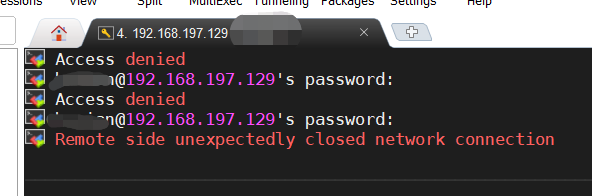
Linux SSH Access denied(拒绝访问)解决方案 新安装的 CentOS 7 使用 SSH 连接出现 Access denied,记录一下这个坑。详细问题如下(见图):解决方案查了下资料,Linux 系统默认就是禁止远程登录的。那就打开权限就行了。因为需要修改系统设置,普通用户会出现没有权限,所以在超级管理员下操作!编辑配置文件:vim /etc/ssh/sshd_config修改 PermitRootLogin 为 yes退出编辑:按下 'Esc' 键,输入 ':wq',回车保存即可。重启 SSH:systemctl restart sshd大功告成,可以使用 ssh 链接了~~