
搜索到
1
篇与
的结果
-
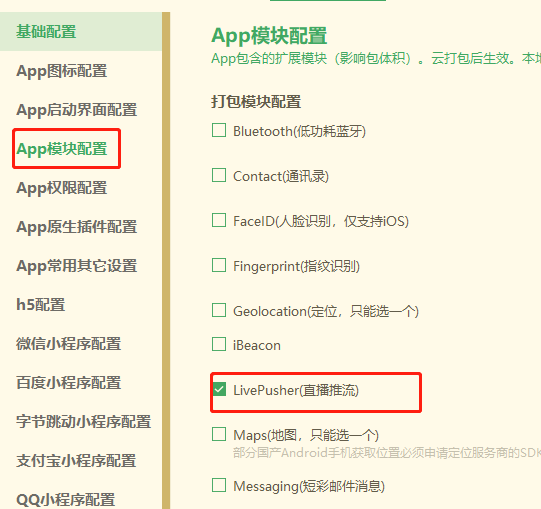
 uni-app人脸识别功能 在听到人脸识别,连忙去看看,去阿里 腾讯 看他们的人脸识别方法,官方sdk什么的。到后来,需求确定了,拍照(照片)上传,后台去识别是不是本人,这一瞬间从天堂到地狱,放着官方那么好的方法,不要。用照片,还的自己去写,去实现。下面为大家提供一个 uni-app 自动拍照 上传照片 后端做匹配处理。参考插件市场的 https://ext.dcloud.net.cn/plugin?id=4892在使用前 先去manifest.json 选择APP模块配置, 勾选直播推流 直接采用nvue开发,直接使用live-pusher组件进行直播推流,如果是vue开发,则需要使用h5+的plus.video.LivePusher对象来获取 nuve js注意事项 注意nuve 页面 main.js 的封装函数 。无法直接调用(小程序其他的端没有测试)在APP端 this.api报错,显示是undefined,难道nvue页面,要重新引入api文件在APP端,main.js中挂载Vuex在nvue页面无法使用this.$store.state.xxx简单粗暴点直接用uni.getStorageSync 重新获取一遍//获取用户数据 userInfo在Data里定义 this.userInfo = uni.getStorageSync('userInfo')nuve css注意事项 单位只支持px其他的em,rem,pt,%,upx 都不支持需要重新引入外部css不支持使用 import 的方式引入外部 css<style src="@/common/test.css"></style>默认flex布局display: flex; //不需要写 //直接用下面的标签 flex-direction: column; align-items: center; justify-content: space-between;页面样式<view class="live-camera" :style="{ width: windowWidth, height: windowHeight }"> <view class="title"> {{second}}秒之后开始识别 </view> <view class="preview" :style="{ width: windowWidth, height: windowHeight-80 }"> <live-pusher id="livePusher" ref="livePusher" class="livePusher" mode="FHD" beauty="1" whiteness="0" aspect="2:3" min-bitrate="1000" audio-quality="16KHz" :auto-focus="true" :muted="true" :enable-camera="true" :enable-mic="false" :zoom="false" @statechange="statechange" :style="{ width: cameraWidth, height: cameraHeight }"></live-pusher> <!--提示语--> <cover-view class="remind"> <text class="remind-text" style="">{{ message }}</text> </cover-view> <!--辅助线--> <cover-view class="outline-box" :style="{ width: windowWidth, height: windowHeight-80 }"> <cover-image class="outline-img" src="../../static/idphotoskin.png"></cover-image> </cover-view> </view> </view>JS部分<script> import operate from '../../common/operate.js' import api from '../../common/api.js' export default { data() { return { //提示 message: '', //相机画面宽度 cameraWidth: '', //相机画面宽度 cameraHeight: '', //屏幕可用宽度 windowWidth: '', //屏幕可用高度 windowHeight: '', //流视频对象 livePusher: null, //照片 snapshotsrc: null, //倒计时 second: 0, ifPhoto: false, // 用户信息 userInfo: [] }; }, onLoad() { //获取屏幕高度 this.initCamera(); //获取用户数据 this.userInfo = uni.getStorageSync('userInfo') setTimeout(() => { //倒计时 this.getCount() }, 500) }, onReady() { // console.log('初始化 直播组件'); this.livePusher = uni.createLivePusherContext('livePusher', this); }, onShow() { //开启预览并设置摄像头 this.startPreview(); }, methods: { //获取屏幕高度 initCamera() { let that = this uni.getSystemInfo({ success: function(res) { that.windowWidth = res.windowWidth; that.windowHeight = res.windowHeight; that.cameraWidth = res.windowWidth; that.cameraHeight = res.windowWidth * 1.5; } }); }, //启动相机 startPreview() { this.livePusher.startPreview({ success(res) { console.log('启动相机', res) } }); }, //停止相机 stopPreview() { let that = this this.livePusher.stopPreview({ success(res) { console.log('停止相机', res) } }); }, //摄像头 状态 statechange(e) { console.log('摄像头', e); if (this.ifPhoto == true) { //拍照 this.snapshot() } }, //抓拍 snapshot() { let that = this this.livePusher.snapshot({ success(res) { that.snapshotsrc = res.message.tempImagePath; that.uploadingImg(res.message.tempImagePath) } }); }, // 倒计时 getCount() { this.second = 5 let timer = setInterval(() => { this.second--; if (this.second < 1) { clearInterval(timer); this.second = 0 this.ifPhoto = true this.statechange() } }, 1000) }, // 图片上传 uploadingImg(e) { let url = e // console.log(url); let that = this uni.uploadFile({ url: operate.api + 'api/common/upload', filePath: url, name: 'file', formData: { token: that.userInfo.token }, success(res) { // console.log(res); let list = JSON.parse(res.data) // console.log(list); that.request(list.data.fullurl) } }) }, //验证请求 request(url) { let data = { token: this.userInfo.token, photo: url } api.renzheng(data).then((res) => { // console.log(res); operate.toast({ title: res.data.msg }) if (res.data.code == 1) { setTimeout(() => { operate.redirectTo('/pages/details/details') }, 500) } if (res.data.code == 0) { setTimeout(() => { this.anew(res.data.msg) }, 500) } }) }, // 认证失败,重新认证 anew(msg) { let that = this uni.showModal({ content: msg, confirmText: '重新审核', success(res) { if (res.confirm) { // console.log('用户点击确定'); that.getCount() } else if (res.cancel) { // console.log('用户点击取消'); uni.navigateBack({ delta: 1 }) } } }) }, } }; </script>css 样式<style lang="scss"> // 标题 .title { font-size: 35rpx; align-items: center; justify-content: center; } .live-camera { .preview { justify-content: center; align-items: center; .outline-box { position: absolute; top: 0; left: 0; bottom: 0; z-index: 99; align-items: center; justify-content: center; .outline-img { width: 750rpx; height: 1125rpx; } } .remind { position: absolute; top: 880rpx; width: 750rpx; z-index: 100; align-items: center; justify-content: center; .remind-text { color: #dddddd; font-weight: bold; } } } } </style>